Building a Real-Time Chat Application with Flask and Socket.IO
Case Details
Introduction
In today's interconnected world, real-time communication has become essential. This blog post explores a modern chat application built with Python Flask, featuring real-time messaging, room management, and user authentication. The application demonstrates best practices in web development, combining Flask's simplicity with Socket.IO's real-time capabilities.
Technology Stack
The application is built using a robust stack of modern web technologies:
- Backend Framework: Flask 3.0.3 - A lightweight and flexible Python web framework
- Real-Time Communication: Flask-SocketIO 5.3.6 - WebSocket support for bidirectional communication
- Database: MySQL with SQLAlchemy ORM - Reliable relational database with object-relational mapping
- Authentication: Flask-Login 0.6.3 - Session-based user authentication
- Image Processing: Pillow 10.4.0 - Image conversion and optimization to WebP format
- Email Integration: Flask-Mail 0.10.0 - Email notifications for feedback submissions
- Production Server: uWSGI - High-performance WSGI server for production deployment
Key Features
1. Real-Time Messaging
The application leverages Flask-SocketIO to provide instant message delivery. Users can join multiple chat rooms and receive messages in real-time without page refreshes. The Socket.IO implementation supports:
- Room-based messaging: Users join specific rooms and receive messages only from their current room
- Online status tracking: Real-time updates of user online/offline status
- Message broadcasting: Efficient message distribution to all room members
- Connection management: Automatic handling of user connections and disconnections
2. Room Management System
Users can create, join, and manage chat rooms with a flexible permission system:
- Room Creation: Any authenticated user can create new chat rooms
- Room Membership: Users must join rooms before sending messages
- Room Management: Room creators can close or delete their rooms
- Active Room Filtering: Only active rooms are displayed in the interface
3. User Authentication & Profile Management
A secure authentication system with comprehensive profile management:
- Session-based Authentication: Secure login using Flask-Login
- Password Security: Bcrypt hashing for password storage
- Profile Management: Users can update their name and password
- Avatar Upload: Profile picture upload with automatic WebP conversion
- UUID7 Naming: Uploaded images use UUID7 for unique, collision-free filenames
4. Modern Image Handling
The application includes sophisticated image processing capabilities:
- Automatic Format Conversion: All uploaded images are automatically converted to WebP format
- Optimization: Quality optimization (85% quality) to balance file size and image quality
- Format Support: Accepts PNG, JPEG, JPG, and GIF formats
- Storage Organization: Images stored in
assets/uploadsdirectory with UUID7-based naming - Transparency Handling: Automatic conversion of RGBA images to RGB with white background
5. Responsive Design
The frontend is built with Bootstrap 5, providing a responsive design that works seamlessly across devices:
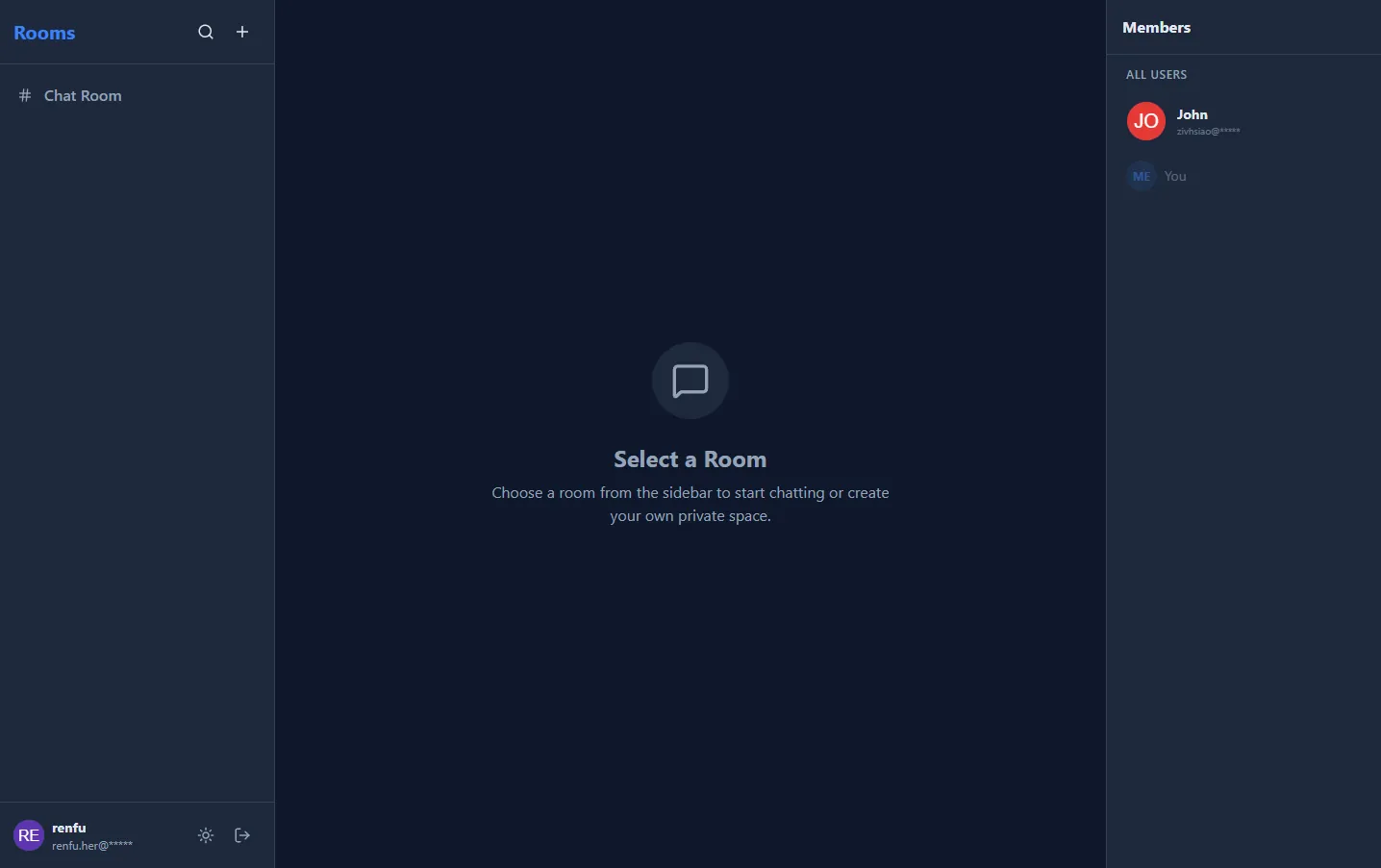
- Desktop Layout: Three-column layout with rooms sidebar, chat area, and members sidebar
- Mobile Optimization: Collapsible navigation and mobile-friendly room selection
- Visual Feedback: Color-coded room selection highlighting
- Real-time Updates: Dynamic UI updates without page reloads
6. Feedback System
An integrated feedback mechanism allows users to submit feedback:
- Feedback Form: Accessible via modal dialog in the navigation bar
- Database Storage: All feedback is persisted to the database
- Email Notifications: Automatic email notifications to administrators
- User Association: Logged-in users' feedback is automatically linked to their account
Architecture Overview
Application Structure
The application follows a clean, modular architecture:
app/
├── controllers/     # Route handlers (auth, rooms, messages, feedback)
├── models/         # Database models (User, Room, Message, Feedback)
├── services/       # Business logic (Socket.IO namespace handlers)
├── extensions.py   # Flask extensions initialization
└── config.py       # Configuration management

public/             # Frontend templates and static assets
├── index.html      # Main chat interface
├── auth/           # Authentication pages
└── admin/          # Admin interface
Database Schema
The application uses a well-designed relational database schema:
- users: User accounts with email, password hash, name, role, and profile image
- rooms: Chat rooms with name, creator, and active status
- room_memberships: Many-to-many relationship between users and rooms
- messages: Chat messages with room association, author, content, and timestamp
- feedbacks: User feedback submissions with optional user association
Real-Time Communication Flow
- Connection: User connects via Socket.IO and authenticates through Flask-Login session
- Room Joining: User joins a specific room using
join_roomevent - Message Sending: Messages are sent via
send_messageevent - Broadcasting: Server broadcasts messages to all users in the room
- Status Updates: Online/offline status changes are broadcasted to all connected clients
Technical Highlights
1. Threading Mode for Socket.IO
The application uses threading mode instead of async mode, which is important for Flask-SocketIO:
# uwsgi.ini configuration
processes = 2
threads = 10
enable-threads = true
This ensures compatibility with Flask-SocketIO's threading mode and prevents issues with gevent/async mode.
2. Automatic Database Migration
The application includes automatic schema migration:
- Tables are created automatically on first run
- Missing columns are detected and added dynamically
- No manual migration scripts required
3. Security Features
- Password Hashing: Bcrypt with automatic salt generation
- Session Security: Configurable secure cookie settings
- Path Traversal Protection: File upload routes validate file paths
- Authentication Required: Protected routes require user authentication
- Input Validation: Comprehensive validation for all user inputs
4. Image Optimization
The image upload system demonstrates best practices:
# Automatic WebP conversion with quality optimization
image.save(filepath, 'WEBP', quality=85, method=6)
- Format Conversion: All images converted to WebP for better compression
- Quality Control: 85% quality provides excellent balance
- Unique Naming: UUID7 ensures no filename collisions
- Old File Cleanup: Previous avatars are automatically deleted
Deployment Considerations
Development Mode
For development, the application can be run directly:
python wsgi.py
This uses eventlet for Socket.IO support and provides a development-friendly environment.
Production Deployment
For production, the application uses uWSGI:
uwsgi --ini uwsgi.ini
Key production considerations:
- Process Management: Multiple worker processes for better performance
- Threading: Thread-based concurrency for Socket.IO compatibility
- Logging: Comprehensive logging for debugging and monitoring
- Reload Mechanism: Touch-reload support for zero-downtime updates
- Reverse Proxy: Designed to work with Nginx as reverse proxy
Environment Configuration
The application uses environment variables for configuration:
- Database connection settings
- Email SMTP configuration
- Secret keys for session management
- Upload folder paths
All sensitive configuration is managed through .env files, keeping credentials out of version control.
API Endpoints
Authentication
POST /auth/login- User loginPOST /auth/logout- User logoutGET /auth/me- Get current user informationPOST /auth/register- User registrationPUT /auth/profile- Update user profilePOST /auth/profile/upload- Upload profile picture
Rooms
GET /rooms- List all active roomsPOST /rooms- Create new roomPOST /rooms/<id>/join- Join a roomPOST /rooms/<id>/leave- Leave a roomPOST /rooms/<id>/close- Close a room (members only)DELETE /rooms/<id>- Delete a room (members only)
Messages
GET /rooms/<id>/messages- Get room messages with pagination
Feedback
POST /feedback- Submit feedback form
Socket.IO Events
Client to Server
join_room- Join a chat roomleave_room- Leave a chat roomsend_message- Send a message to a roomtyping- Broadcast typing indicator
Server to Client
ready- Connection confirmed with user infoonline_users- List of currently online usersuser_online- User came onlineuser_offline- User went offlinenew_message- New message receivedroom_deleted- Room was deletedroom_closed- Room was closed
Best Practices Demonstrated
- Separation of Concerns: Clear separation between controllers, models, and services
- Error Handling: Comprehensive error handling with proper HTTP status codes
- Logging: Strategic logging for debugging and monitoring
- Security: Multiple layers of security including authentication, validation, and path protection
- Performance: Optimized image handling and efficient database queries
- User Experience: Responsive design with real-time updates and visual feedback
Conclusion
This Flask-based chat application demonstrates how to build a modern, real-time web application using Python. It combines the simplicity of Flask with the power of Socket.IO to create an engaging user experience. The application showcases best practices in web development, including secure authentication, efficient database design, real-time communication, and optimized asset handling.
Whether you're building a team collaboration tool, customer support chat, or a community platform, this architecture provides a solid foundation that can be extended and customized to meet your specific needs.
Getting Started
To get started with this application:
- Clone the repository
- Set up a Python virtual environment
- Install dependencies:
pip install -r requirements.txt - Configure your
.envfile with database and email settings - Run the application:
python wsgi.py - Access the application at
http://localhost:5000
The application will automatically create the database schema and seed initial data on first run.
Built with Flask, Socket.IO, and modern web technologies.
For more information, visit the project repository or check the README.md file.
Project Information
- Python
- Published: 2025-11-02
- 165 views
- Visit Website